


Lenovo’s RTX Spark challenger to the MacBook Pro feels like more time and thought was put into it, compared to its competition.
Price When Reviewed
This value will show the geolocated pricing text for product undefined
Best Pricing Today
Base: $2,999.99; As reviewed: $3,249
Maybe it’s the opening lines of a movie or that sense of relief as you ease into a new car. Certain products simply signal that you’re in for a good time, and Lenovo’s Pro 9n gave me that feeling as I opened the lid.
Sure, this is an RTX Spark machine, whose price tag suggests you’d better own a Mercedes and party on the Vineyard. It’s also hard to believe that Nvidia granted Lenovo any extra time to design this laptop. Still, it feels more fully developed than the competition I’ve touched.
We were given the “cheaper” version of Lenovo’s laptop for review, and I was relieved to discover that you can save a few bucks without giving up much in performance. The battery life and audio subsystem were outstanding, too. I’ll miss this one.
Officially, this laptop is known as the Lenovo Pro 9 15N1X11, though Lenovo refers to it as the “Lenovo Pro 9n NVIDIA (15″)” on its website. Right now, that’s the only place that you can buy it, it appears, though Lenovo offers limited opportunities to tweak the laptop as you’d like. Though the “Yoga” name doesn’t appear in the product literature, you’ll see a “YOGA” logo appear during the boot cycle.
Lenovo’s base model costs $2,999, slightly more than the $2,599 Surface Laptop Ultra. It ships with the RTX Spark N1X 18-core chip and 32GB of soldered LPDDR5X memory, with a 512GB M.2 SSD. Lenovo’s website was a little finicky, not allowing me to see the additional configuration options until reloading the page a few times.
After that, however, you can see the adders: you can increase the storage to 1TB ($200) or 2TB ($650). The 20-core N1X costs $450 extra and brings the total up to $4,249, but it unlocks 64GB of RAM (standard) and 128GB of RAM (an additional $1,400) and gives you the option of adding 2TB of storage for an additional $450. (The 1TB SSD option is PCIe Gen 4; the 2TB SSD is PCIe Gen 5.)
You’ll have the option of including some additional peripherals, and an upgrade to Windows 11 Pro costs an additional $50. A top-of-the-line configuration should cost $6,149.99. Yikes.
Mark Hachman / Foundry
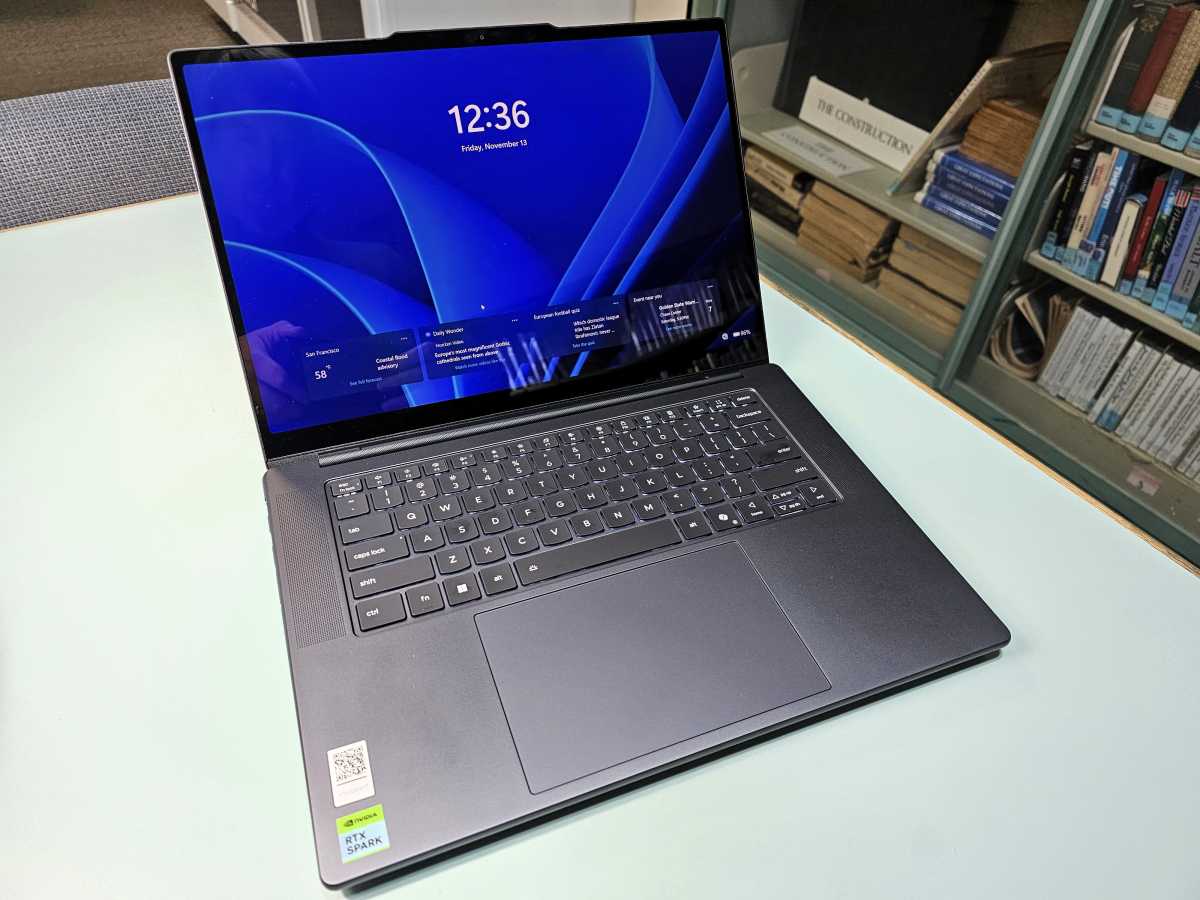
The RTX Spark laptops that I’ve handled tend to be dense, packing in as much compute and cooling as possible. At 3.64 pounds, Lenovo’s laptop is a bit lighter than the Surface Laptop Ultra, which climbs over four. It feels a little heavier than a normal laptop, but not much. If you’ve used a Lenovo Yoga laptop before, this doesn’t feel too different save for the additional weight.
Nevertheless, the Lenovo Pro 9n feels solidly constructed, with no give anywhere that I could feel. The display reclines almost flat, though the little bit of give at the end means that I was leery about inking on it. (Lenovo ships the Yoga Pen Gen 2 with the Lenovo Pro 9 laptop, but you can only draw on the touchpad.)
My first instinct is to say that this isn’t really a creator-class laptop. On the other hand, if you’re using this laptop for generating your own AI vibe-code apps and processes, sketching a UI element might be part of your process. Thus, the pen.
Mark Hachman / Foundry
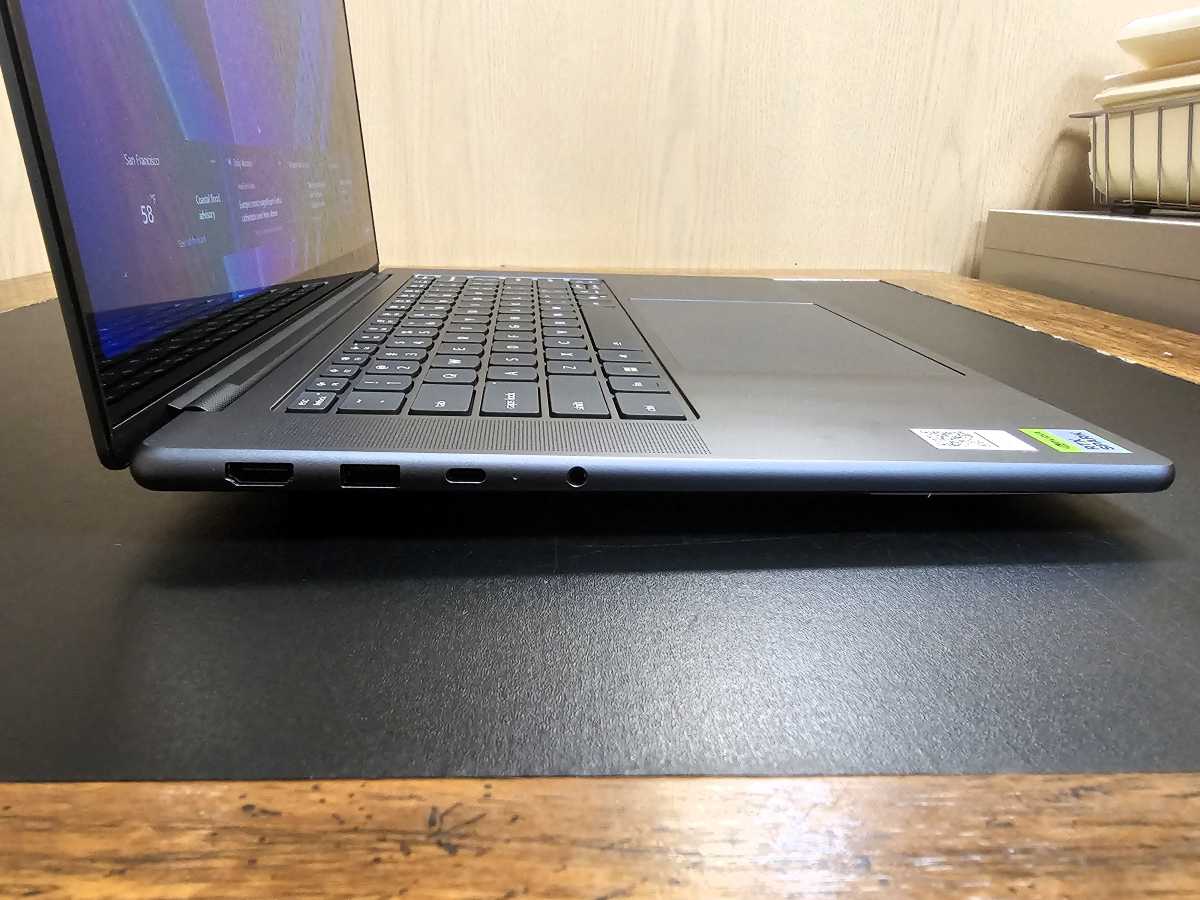
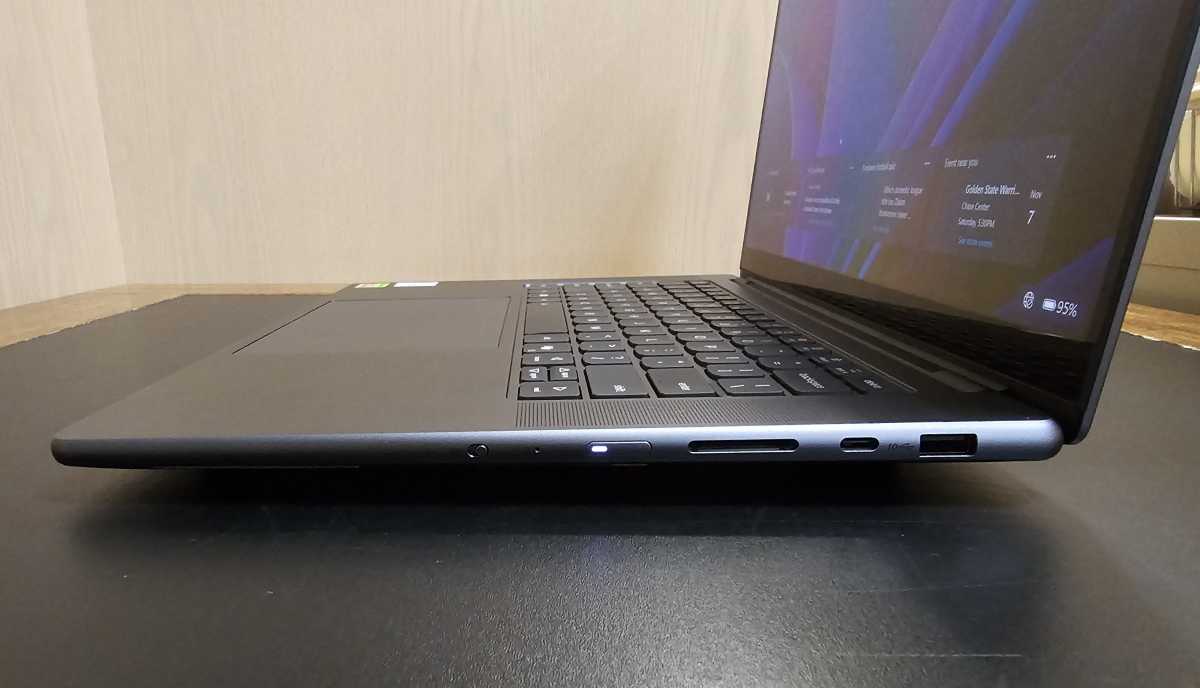
From a connectivity perspective, Lenovo’s Pro 9n continues the trend of including three USB4 (the generic term for Thunderbolt 4) ports, available on either side. Add to that two USB-A ports, an SD card slot, a headphone jack, and an HDMI port, and that’s the ideal lineup of ports for me. Two USB-A ports on either side mean that you can connect a wired mouse on one while running the USB-C cables from the other.
Keep in mind, though, that the power demands of this laptop might mean that you won’t be able to use an older USB4/Thunderbolt 4 dock with this laptop. The Lenovo Pro 9n uses a 140W USB-C charger (included in the box, of course) which will probably exceed the capabilities of an older docking station. (A Thunderbolt 5 dock, however, supplies that 140W natively.) Expect a few cables to snake around this laptop, otherwise.
What’s the best feature of the Lenovo Pro 9n? For me, it would have to be the quiet, unobtrusive fans. Our review unit shipped with the less powerful N1X option, configured to run at maximum performance while on wall power, and at maximum battery life while on battery.
Even running an intensive benchmark on wall power, the fans remained exceptionally neutral. Did that affect performance? You’ll have to scroll down to our performance tests to see. Still, the hallmark of truly AI PCs (including those designed for gaming) is fans running at maximum, whirring and consuming power and spewing heat throughout the room. I was quite impressed by this laptop’s quiet operation.
Mark Hachman / Foundry
Add that to the Lenovo’s lovely OLED screen, and I think you’ll be quite impressed as you first begin using this laptop.
I’m a fan of OLED displays. I have been since I first saw them on Samsung’s laptops a few years ago. In terms of resolution, Lenovo’s PureSight Pro 2560×1600 display is actually disappointing, only slightly better than a typical 1400p display and less than the 3840×2160 resolution that defines a 4K display. Peak brightness at SDR levels is 460 nits, well above the 260-nit output we consider appropriate. Still, it’s a bit short of what I expected. The display is rated for Dolby Vision and DisplayHDR True Black 1,000 with a rated 1,110 nits of brightness in HDR mode.
That’s not to say that it doesn’t look great, however. OLED displays typically consume a bit more in terms of battery life, but make up for it in terms of increased visual quality including inky blacks. It’s a pleasure to use, certainly.
Foundry
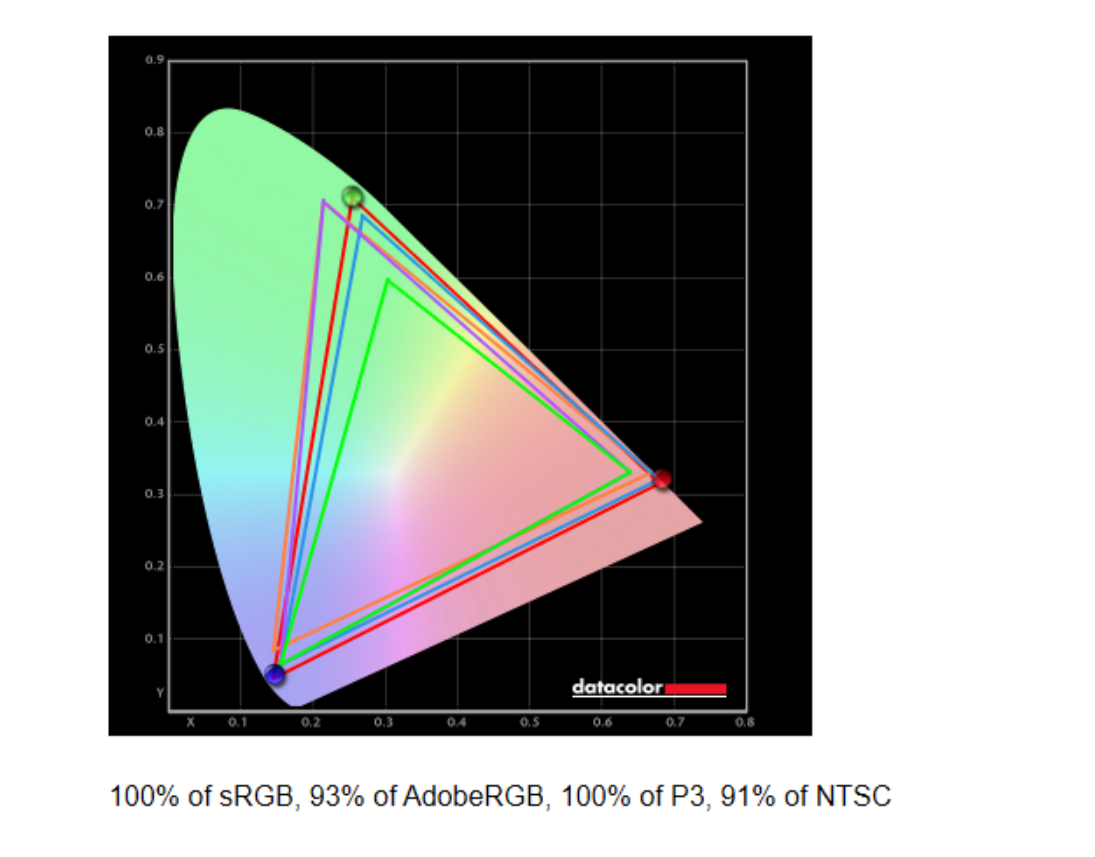
For whatever reason, color management is left to the Lenovo Vantage utility application, where you can switch into modes specifically designed for Adobe RGB (design and print), sRGB (typical Internet usage), P3-D65 (photography), a native “vivid color” setting, REC709 for video watching, and DCI-P3 (optimized for video editing). There are also options to gradually dim the taskbar and background windows to preserve the OLED screen and prevent burn-in.
Our review laptop was configured with the dynamic refresh rate enabled. Dynamic refresh rate allows the laptop to cycle the refresh rate up to its peak 165Hz for gaming and scrolling, creating a smooth viewing experience. When not in use or with a user staring at a fixed screen, the laptop will drop into a lower-power, slower refresh rate (48Hz) to conserve power.
My experience wasn’t perfect. I did see this one weird visual glitch somewhat early in the testing process. It wasn’t repeated.

Mark Hachman / Foundry
I can’t speak for all of the RTX Spark laptops, but of those I’ve tried — from Microsoft, Asus, and Lenovo — the Microsoft Surface Laptop Ultra has the best by far. Lenovo’s audio (a pair of 2W tweeters, and another pair of 2W woofers) is definitely among the better laptop audio solutions, though everything naturally sounds a bit flat. My guess is Lenovo and their rivals turned its slightly thicker laptops (necessitated by the cooling needs) into an advantage for its audio team.
Fortunately, laptops have solved an issue from a few years ago, where at high volumes everything sort of mushed together. Now, you can jack up the volume without consequence.
The laptop’s mics captured my voice pretty well, perhaps not as well as a lav mic or dedicated microphone, but with warmth enough that it could stand alone in a pinch.
The laptop’s noise cancellation was nearly perfect. I record my voice using the laptop’s Windows Sound Recorder app. To this I add a background track of rock music and continue speaking. If it’s working properly, the laptop will record my voice only. In this case, the Lenovo Pro 9n basically recorded my voice only, with just a hint of the song mixed in. Nothing was recorded when I was quiet. With white noise playing in the background, the laptop filtered out the extraneous noise perfectly. This is the ideal scenario for a voice or video call.
This laptop does include an NPU, which I’ve been told measures 52 TOPS. But whether it’s being put to work or not is the question, as the Camera app doesn’t include the NPU-centric filtering options that normally accompany the NPU. The NPU also didn’t measure any activity during my audio test, as measured by the Windows Task Manager.
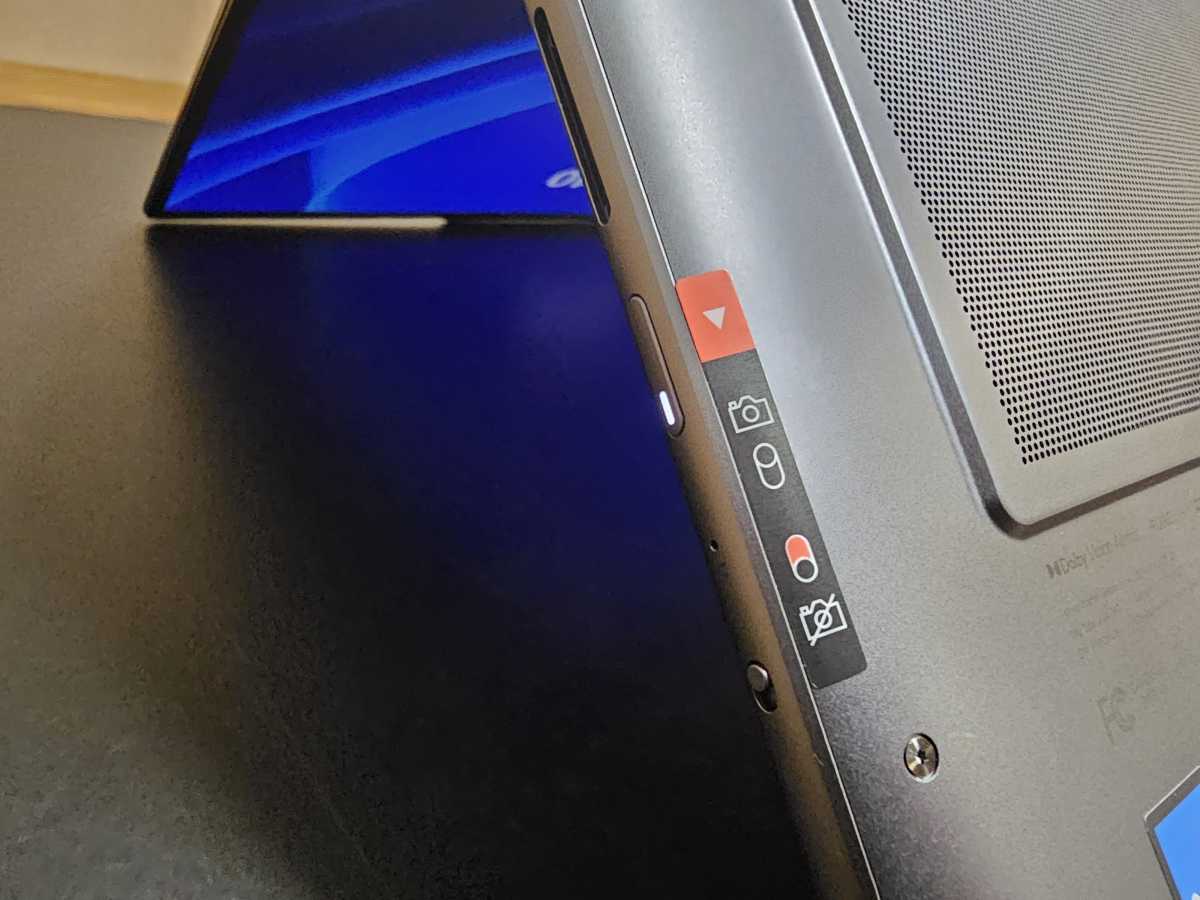
The webcam on the Lenovo Pro 9n is surprisingly good. Normally, most webcams top out at 1080p, forcing users to consider buying an external webcam instead. Here, the webcam resolution climbs to a whopping 2400p (16:10, 30 fps), which is way beyond even a premium, integrated laptop webcam.

Mark Hachman / Foundry
It makes sense — you’re already paying thousands more than you would for an ordinary laptop — but it’s nice that Lenovo’s designers went the extra mile here. About the only room for improvement would be a 60Hz option, but that’s not necessary.
Incidentally, the webcam was a notable weakness on its rival, the Surface Laptop Ultra.
Mark Hachman / Foundry
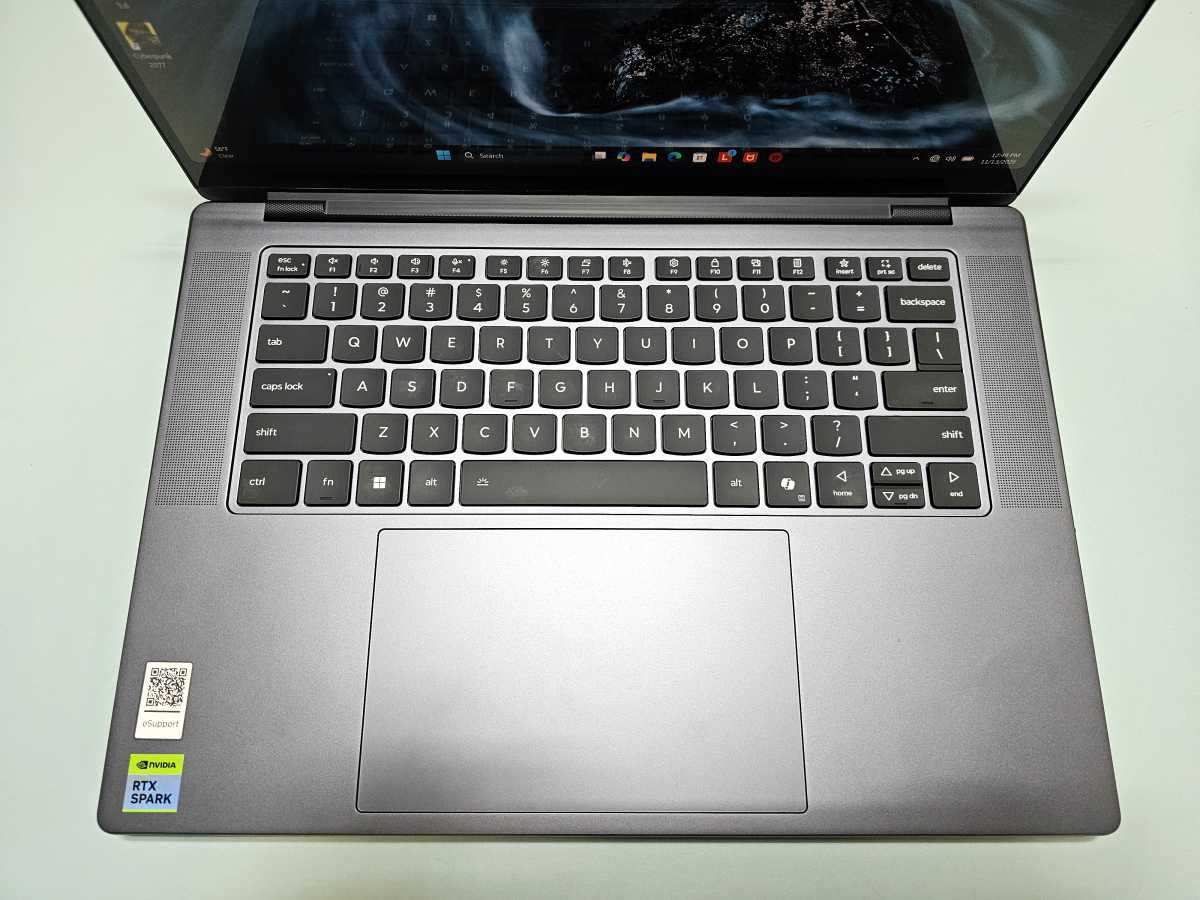
I was crushed to discover that the keyboard on Lenovo’s first Googlebook was so surprisingly bad. Fortunately, I was relieved that it didn’t make the same mistake on its first RTX Spark laptop. The Lenovo Pro 9n features a standard keyboard without an additional keypad, which robs it a bit of productivity.
On the other hand, the laptop’s key travel is 1.5 mm, which is typically about as much as a modern laptop provides. The feel of a keyboard is obviously subjective, but more key travel generally means that your fingers have more “give” when they depress a key, and that generally feels more comfortable under my fingers.
Mark Hachman / Foundry
Interestingly, the keyboard only has two levels of manual backlighting (plus an “auto” function), which is governed by the function key interacting with the space bar. The only other oddity is a dedicated function key to launch the calculator app.
Lenovo also included a haptic trackpad with the Pro 9n, which extends its “clickability” across the entirety of the surface. I certainly appreciate that. The haptics basically “kick back” against your finger when you click it, giving the sensation of a clickable surface. Microsoft is also working to add haptic feedback to various Windows actions, such as hovering over Windows elements.
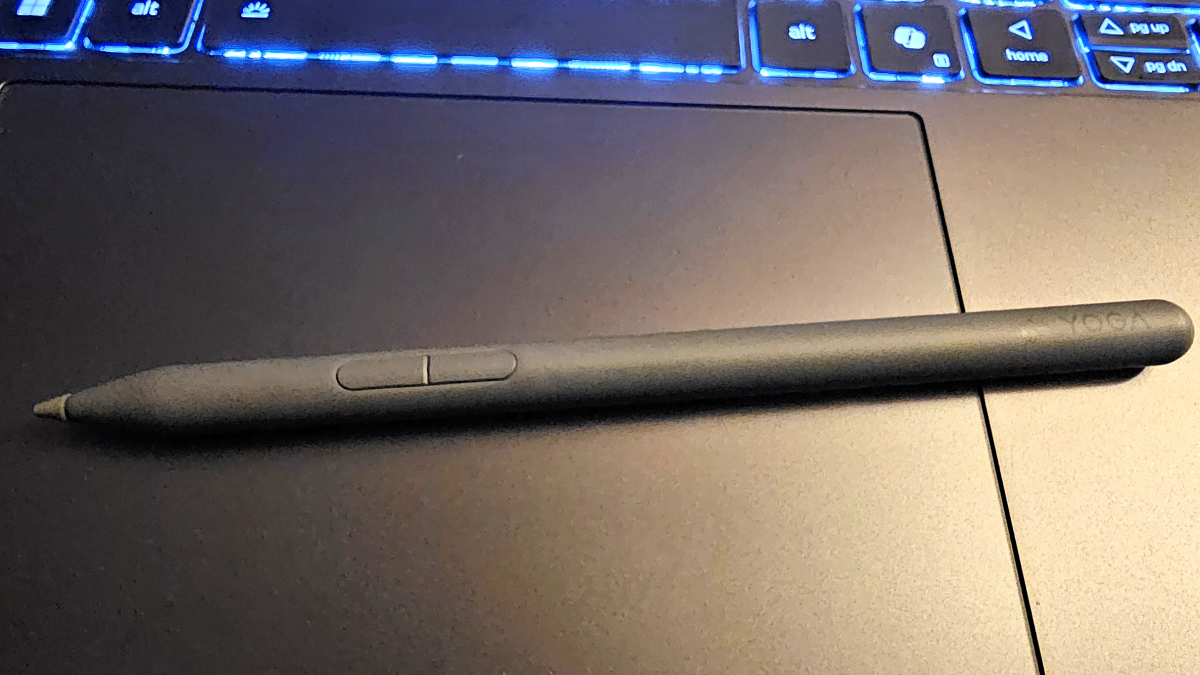
Interestingly, the Yoga Pen Gen 2 isn’t designed to ink on the screen, but on the touchpad. That makes sense, given that the screen doesn’t fully recline. It was surprisingly good at capturing my penmanship, so that I could easily sign a hypothetical document. If you get the pen close enough, you can see where it will make contact and the “ink” will flow.
Mark Hachman / Foundry
Just make sure that the “cursor” is bright enough to be visible, as the pen can sometimes warp to another location on the screen. It also makes it difficult to erase, which can be done by depressing one of the buttons. It must be charged via a built-in USB-C port.
This new breed of laptops based upon the Mediatek/Nvidia RTX Spark platform offer their own set of advantages and disadvantages: the CPU isn’t especially powerful, but there’s an absolute ton of cores to take advantage of. Likewise, the laptop’s integrated GPU challenges other discrete GPUs — the vast majority manufactured by Nvidia, too — and seem especially effective in performing local AI functions.
Lenovo sent its Pro 9n laptop using what you might call the “proper” settings for an RTX Spark, with performance dialed up to the max while on wall power, and set to minimal “best battery life” settings while disconnected. I left the settings untouched, as I normally do, though I didn’t need to test the laptop at maximum performance settings, either.
In addition to the two processor / GPU configurations RTX Spark laptops offer, be aware that how much you pay for larger memory configurations makes a difference, too. RTX Spark laptops share memory between the operating system and the graphics subsystem, which lowers the available memory for graphics processing.
This affects the size of the AI models which can run on the Lenovo Pro 9n. I’m not here to tell you whether a larger model is more accurate, but you’ll at least have access to them. More memory also means that you’ll be able to work with more complex scenes in 3D rendering. All of this comes with a significant financial outlay, however.
I’m going to use my review of the Surface Laptop Ultra as a model for my evaluation of Lenovo’s Pro 9n, picking some of the more relevant tests rather than reproducing the entirety of the test bench.
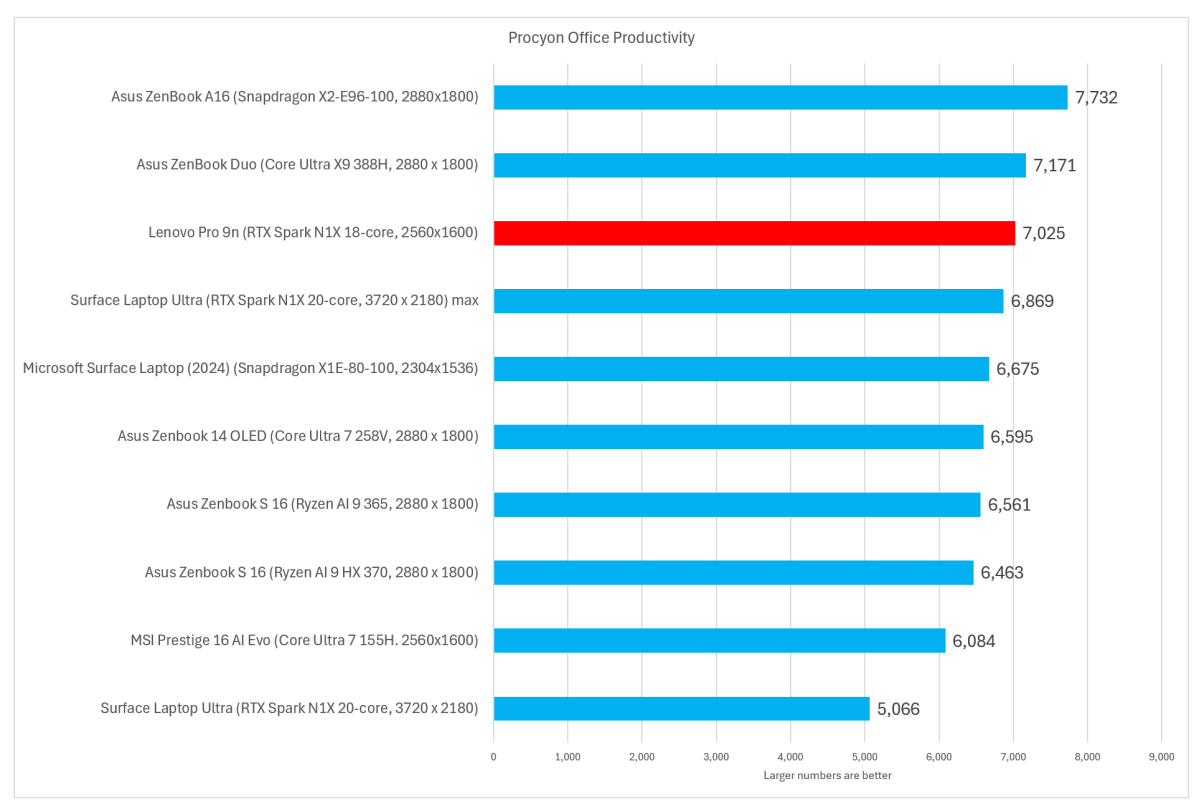
To test the laptop’s processor, I used a real-world test, UL’s Procyon Office Productivity benchmark, which compares the performance in Outlook (classic), plus Excel, PowerPoint, and Word. To that I added Geekbench 6, a synthetic measure of CPU performance alongside a graphics test. For comparison I used the Surface Laptop Ultra and a number of recent productivity laptops.
You’d expect an RTX Spark machine to perform well here, and it does. Again, since Lenovo released at its maximum performance setting, it matches up well to the Surface Laptop Ultra, when its performance is dialed up.
Mark Hachman / Foundry
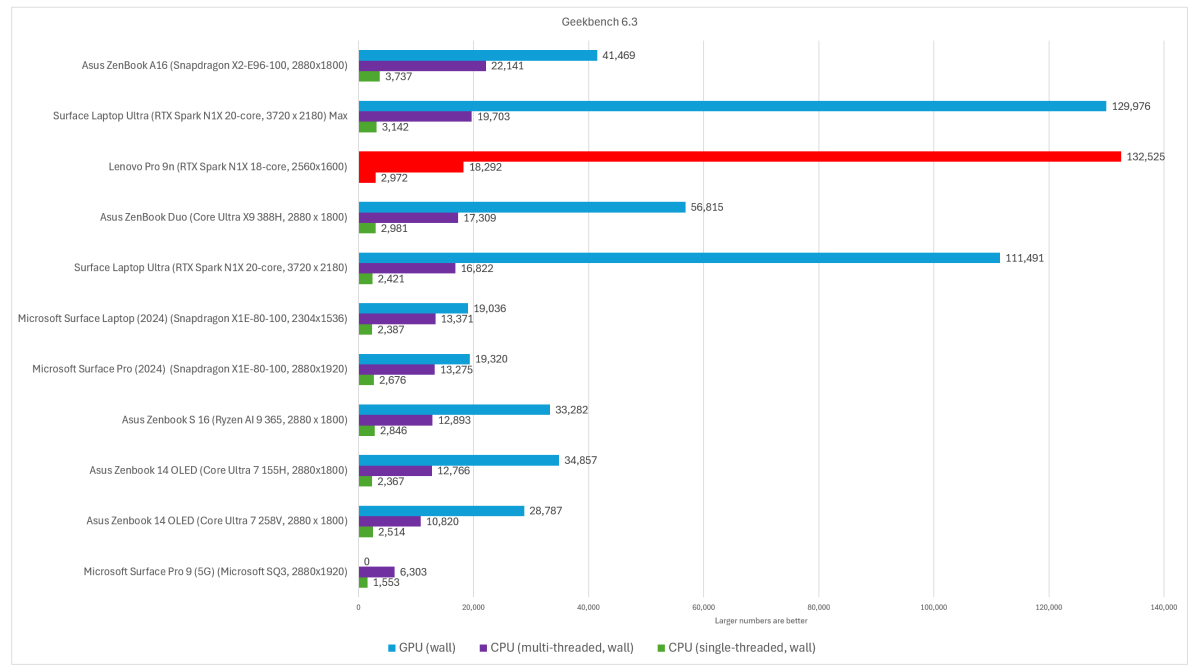
When we compare the performance using the synthetic Geekbench benchmark (indexed to the multi-core CPU benchmark) the Lenovo Pro 9n is near the top of the heap.
Basically, the Snapdragon X2 Elite is the king in terms of multicore CPU performance, but clearly slips where GPU performance is concerned. You’re paying a ton more an RTX Spark laptop, but you’re getting a device whose CPU and GPU performance is very good.
Mark Hachman / Foundry
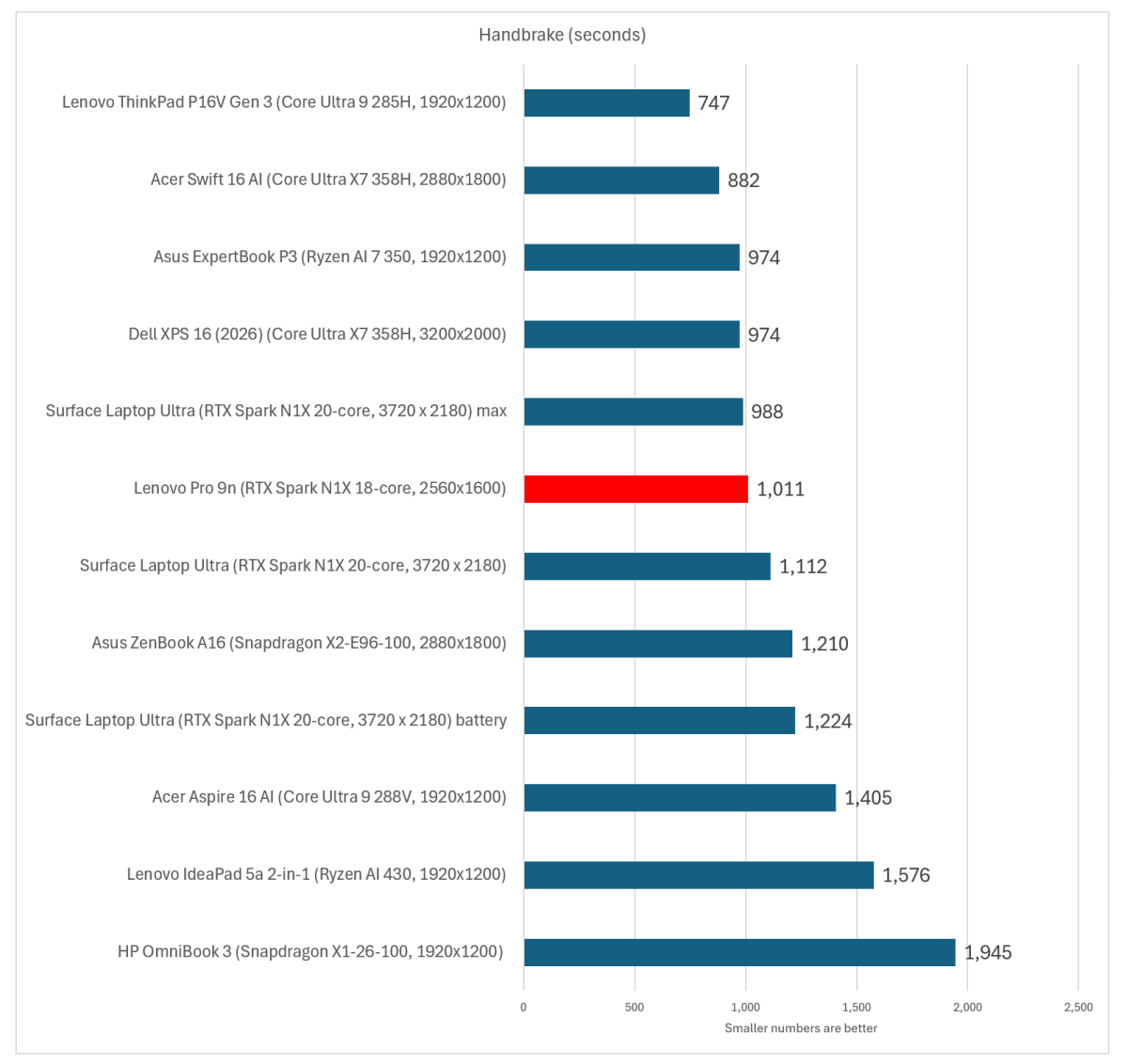
The Handbrake benchmark measures how quickly the laptop transcodes a movie, indicating how long it can maintain its operation at full speed. Lenovo’s Pro 9n finishes in the middle of the pack.
Again, however, I was impressed with how well this laptop cooled itself, leaving me a little surprised that its performance was just average. Cinebench 2024, a CPU benchmark, includes a stress test to determine whether the laptop’s performance will drop after running at full throttle for 10 minutes. The Surface Laptop Ultra did; the Lenovo Pro 9n did not. Likewise, when I asked it to loop a GPU benchmark twenty times in a row, the laptop’s performance only dipped slightly, and within acceptable levels.
Mark Hachman / Foundry
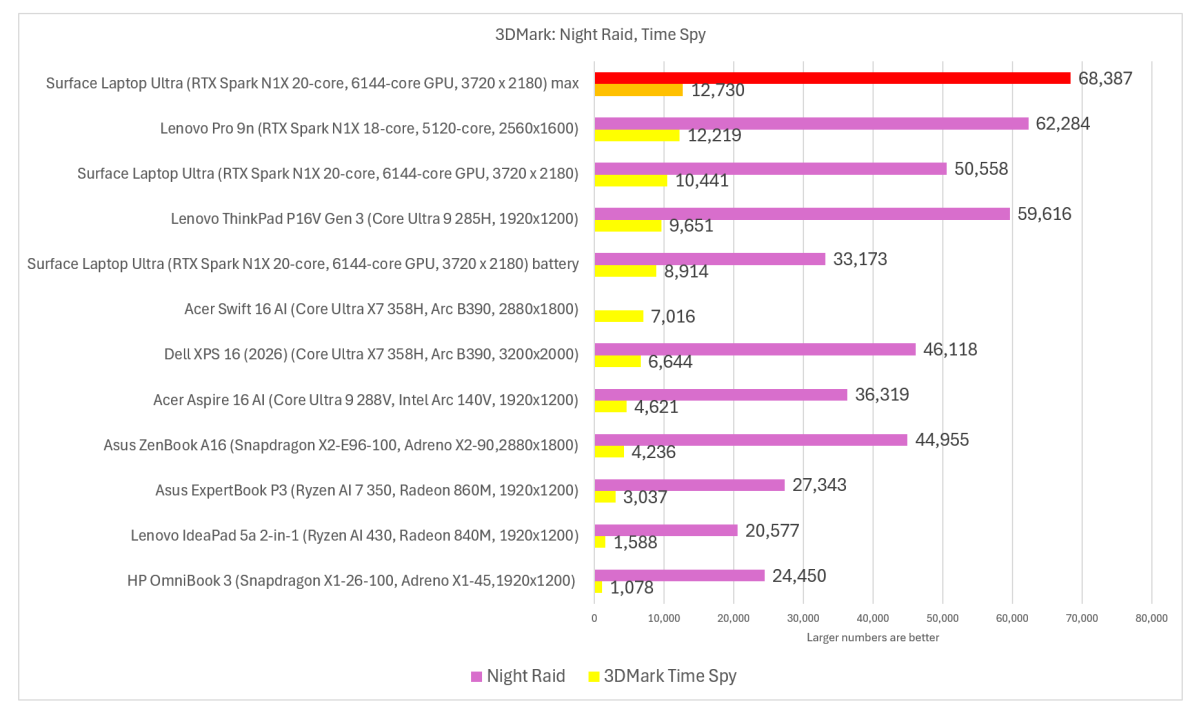
As for those graphics, the Pro 9n and the Surface Laptop Ultra finished at the top of the heap. Not surprising at all. Here, we’re using 3DMark’s Time Spy (x86) and Night Raid (x86 and Arm) as benchmarks.
Intel’s Core Ultra X7 and X9 chips (“Panther Lake”) enjoyed a run at the top of the productivity benchmark list, but the RTX Spark platform has surpassed it.
Mark Hachman / Foundry
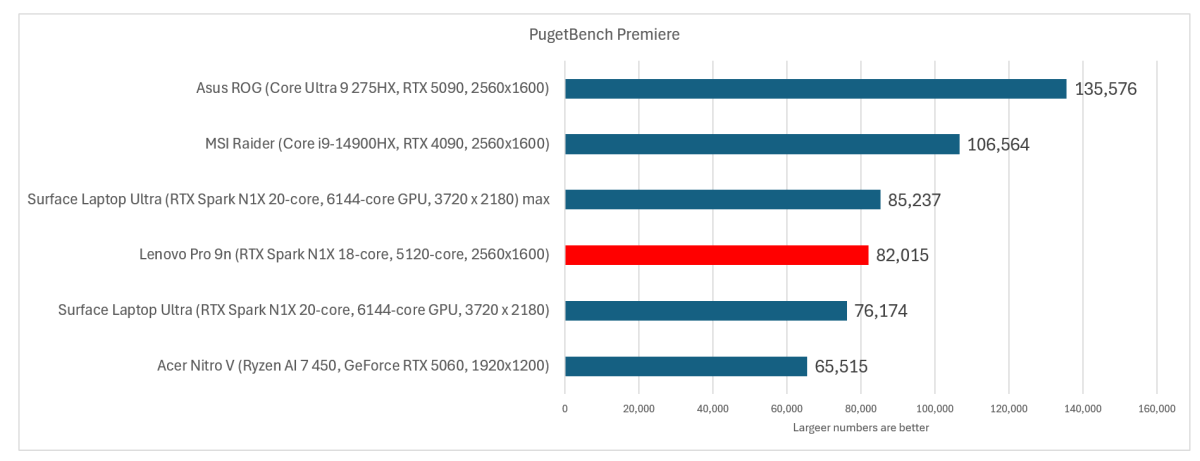
In terms of AI and content-creation benchmarks, the Lenovo Pro 9n’s GPU places it on the level of a midrange gaming laptop. My candidates for comparison included an as-yet unreviewed $1,899 updated version of the Acer Nitro V, with an AMD Ryzen AI 7 450, paired with an RTX 5060 creator-class GPU; a $3,799 MSI Raider, with an Intel Core i9-14900HX, and a last-generation RTX 4090; and a modern monster, $4,299 Asus ROG Strix gaming laptop equipped with a Core Ultra 9 275HX and an RTX 5090.
Again, I chose a subset of the tests I ran before. I began with PugetBench’s automated test of Adobe Premiere, which measures how well this laptop will serve as a video-editing workstation. It doesn’t really compare to a top-tier gaming laptop, but exceeds a low-end “creator-class” notebook relatively easily.
Mark Hachman / Foundry
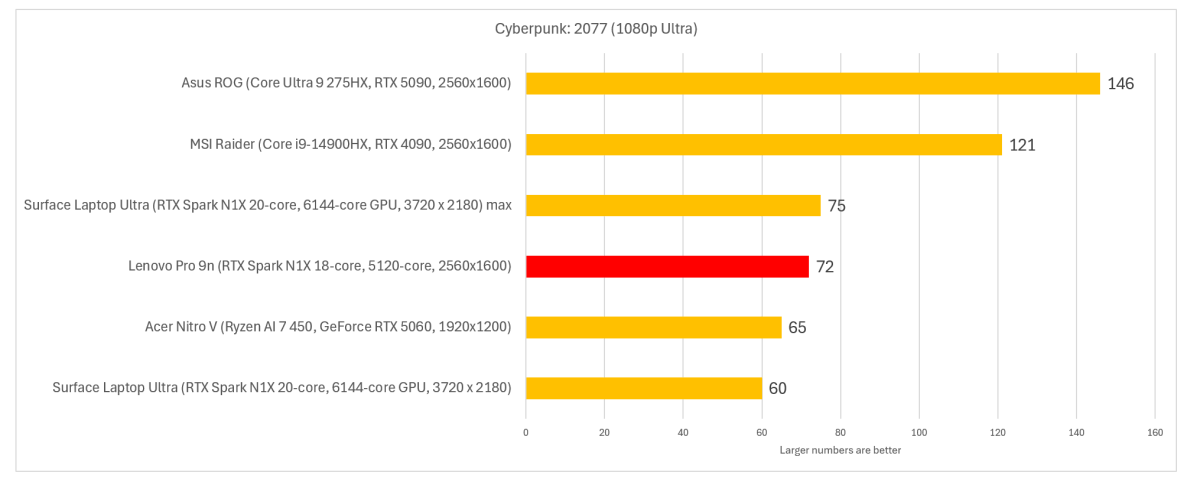
If you’re wondering (as I was) whether the slower, smaller GPU on the lower-end RTX Spark laptops would make a significant difference, a test of the Cyberpunk 2077 first-person shooter dismissed those fears. The slower, smaller GPU does make a difference, though not much.
Again, turning on Nvidia’s DLSS frame generation and upscaling does make a significant difference. At 1080p Ultra settings, the laptop delivered 72 fps, as indicated below. At the more aggressive 1080p Ray Tracing Overdrive settings, framerates were an unplayable 20 fps but with Nvidia’s AI-based DLSS frame generation and upscaling turned on, framerates jumped to 65 fps.
Mark Hachman / Foundry
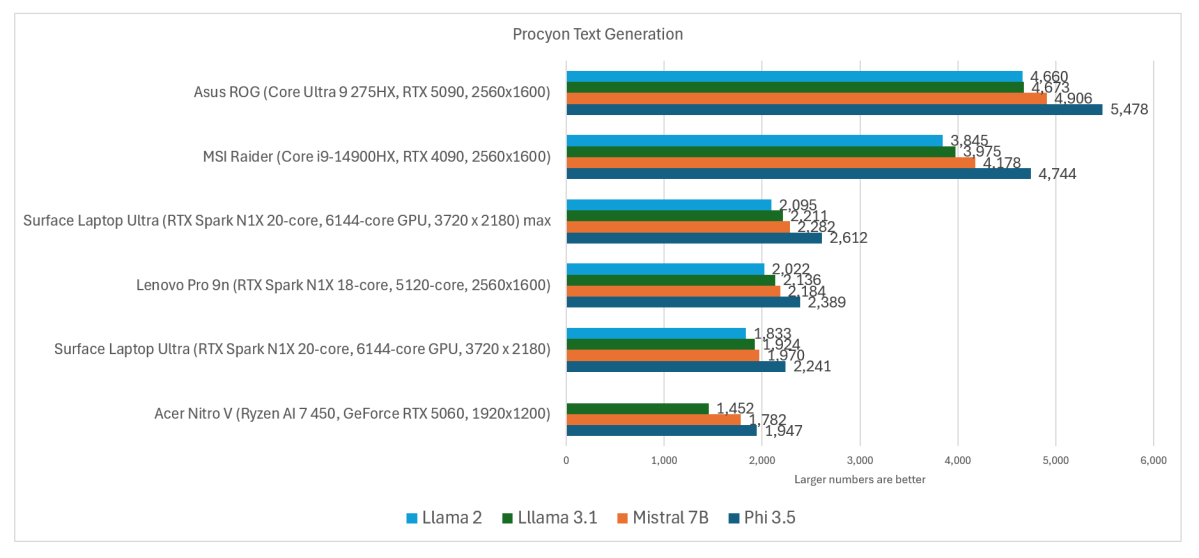
So how does this laptop fare in AI? Again, I tried out the Hermes agentic AI, with a comparable experience to what I experienced with the Surface Laptop Ultra.
In numerical terms, I ran the Procyon AI Text Generation benchmark, with comparable results to the Surface Laptop Ultra. That uses small LLMs to generate text responses to a standardized series of questions, and the time to do so is measured. Again, the Pro 9n is a bit slower than a gaming laptop, but about the performance of the Surface Laptop Ultra.
Mark Hachman / Foundry
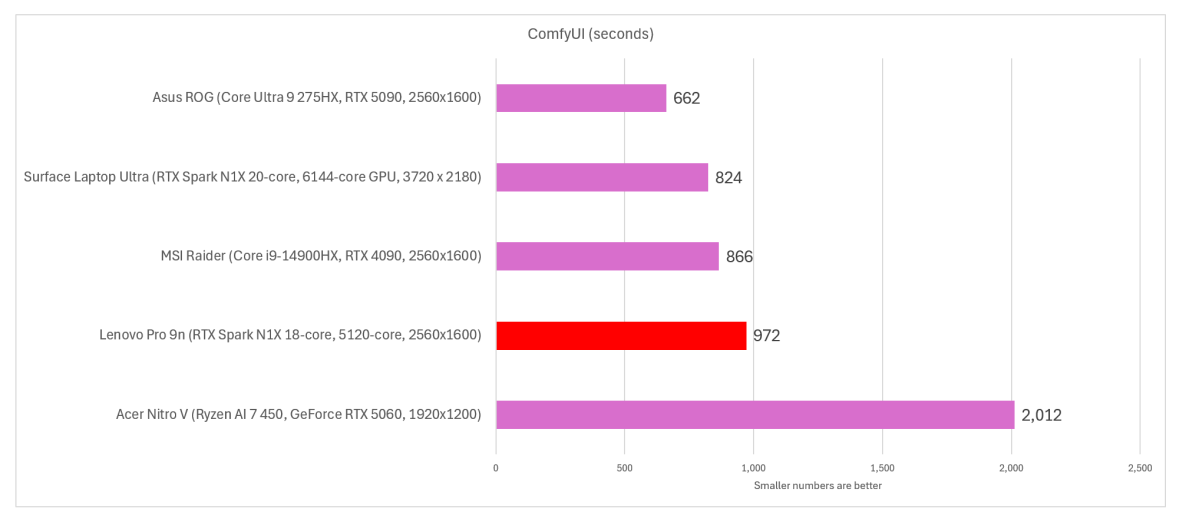
The most aggressive use of AI is probably text-to-video, a real-world application that taps every last bit of laptops like the Lenovo Pro 9n. ComfyUI is a popular application to do this, and the application has a standardized benchmark to run a series of video-generation tasks and measure the time to complete them.
I was a little surprised to see the Pro 9n do somewhat poorly here. On the other hand, this is the time it took to complete three runs (using the Wan preset) plus a warmup run. The difference between the MSI Raider and the Pro 9n would be somewhere on the order of 20 seconds per run.
Mark Hachman / Foundry
As for battery life — well, that will depend on the workload. I used Procyon’s Office Productivity benchmark as a guide, looping it over and over until the laptop ran out of power. Since the benchmark simulates regular Microsoft Office usage, the battery benchmark can tell you how long the laptop will last while performing office tasks while on battery.
The Lenovo Pro 9n lasted 11 hours 40 minutes using this benchmark, which is outstanding.
At this point, I’ve tested two RTX Spark laptops and used a third, the Asus ProArt. The Lenovo Pro 9n is my clear favorite. From a performance standpoint, even the slower version keeps up with the Surface Laptop Ultra, and the experience — from the construction to the webcam to the audio to even the Pen — is definitely superior.
Again, the real variable is the laptop’s memory. As tested, the $3,199 price tag is outlandish enough to anyone who’s approaching Lenovo’s laptop with productivity (and productivity pricing) in mind. Adding more memory and storage raises that price even higher, quickly.
My Macworld colleagues would still argue that a MacBook Pro offers much more performance and therefore value, and they may even be right. I feel much more confident recommending this laptop over the two other RTX Spark laptops I’ve tried, however.


